The business card moments your HR system doesn't see.

Day-one disappointment

Day one. New hire is introduced to the team, takes their seat, opens their laptop. Then someone asks for their card. They don't have one yet - won't for another two weeks. The new hire smiles, says "still waiting on those." It's a small moment. They'll remember it.

Mid-career drift

An employee gets promoted from Senior Manager to Director. The promotion announcement goes out on Monday. By Wednesday, they're meeting clients with cards that still say "Senior Manager." For three months, until the next print run, their card lies about who they are.

Conference shame

A team member flies to a conference. They have a backup pile of cards from when they joined - 50 cards. By the end of day one, they've handed out all of them. For two days, they introduce themselves and write their email on napkins. Their manager sees it on LinkedIn afterward.

Exit overlap

An employee leaves on good terms - they sign their offboarding form, hand back the laptop, return the badge. But they still have business cards in their wallet, in their car, in their previous client meeting follow-ups. For months after they're gone, those cards keep representing your company. You won't know who they're reaching.

Each of these moments shapes how an employee feels about working here. And none of them are in your HRIS.

Lifecycle events in. Cards in pockets out.

DBC1 listens to your HR system. When someone joins, gets promoted, transfers, or leaves - their card follows. No tickets, no print runs, no chasing employees.
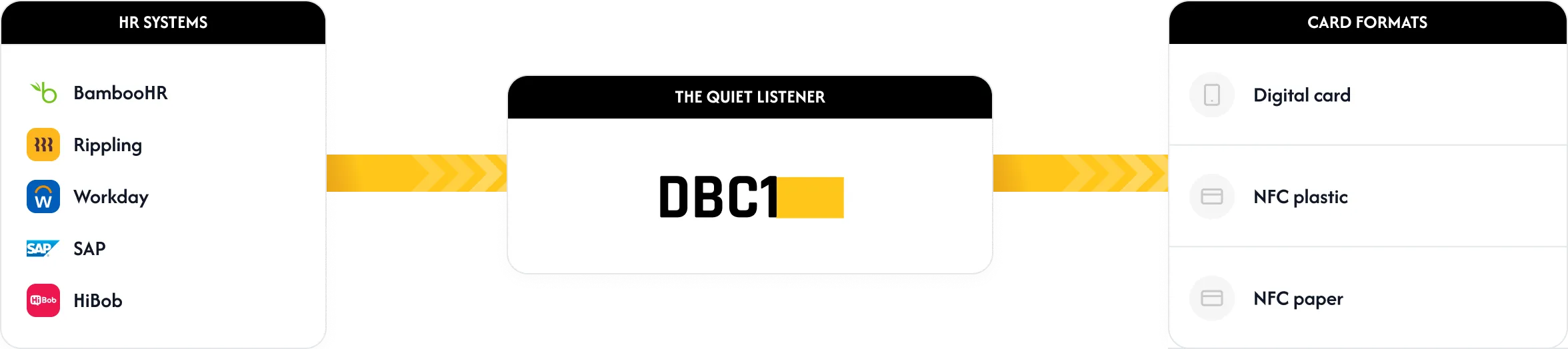
Flow diagram: HR systems connect to DBC1, which delivers digital, NFC plastic, and NFC paper cards

Cards follow people

When you onboard someone in your HR system, their card is provisioned automatically - with their current role, contact details, and photo. When their role changes, the card updates. When they leave, the card stops working. No manual creation, no manual updates, no manual deactivation.

Cards stay on brand

Brand evolves. Logos refresh, colors update, banners change. Once your brand is configured in DBC1, every existing card and every new card inherits the latest version automatically. No batch reprints, no inconsistency between markets, no scrambling when marketing announces a refresh. The brand standard is enforced by the system, not policed by people.

Cards leave behind a record

Every card created, updated, or deactivated is recorded. Who ordered what, when, where it went, who received it. Not just for compliance - for the kind of HR visibility that helps you answer questions before they're asked. "When did this employee join the marketing team?" "How many people in the London office have cards?" "Did anyone in this department get a card before they were officially in role?"

Works with BambooHR, Rippling, Workday, HiBob, SAP, and anything that speaks SCIM.

DBC1 reads from your HR system as a quiet, read-only consumer. Your HR team continues to manage employee data where they always have. DBC1 just makes sure cards reflect it.

HRIS Integration

Once the connection is set up, DBC1 receives lifecycle events from your HRIS in real time. New hire records, role changes, department transfers, employment status changes - DBC1 reads them all and updates the relevant cards automatically. No manual sync, no nightly batch jobs, no drift between systems.

HRISStatusMethod
BambooHRTestedVERIFYNative API
RipplingTestedVERIFYNative API
WorkdayTestedVERIFYSCIM 2.0
HiBobTestedVERIFYNative API
SAP SuccessFactorsSupportedSCIM 2.0
ADPSupportedSCIM 2.0
OtherSupportedSCIM 2.0
What HR doesn't need to do
  • You don't need to manage a separate system. DBC1 doesn't have its own employee database. Your HRIS remains your source of truth.
  • You don't need to coordinate with print shops. Physical fulfillment is handled by DBC1 globally - no purchase orders to local vendors, no chasing print runs, no coordination across markets.
  • You don't need to learn an admin panel. Most HR teams configure once and never log in again. When you need a change (brand refresh, new policy, custom field), you email your concierge.
  • You don't need to police brand inconsistency. Brand is configured centrally and applied to every card automatically. Marketing's standards are enforced by the system, not by HR.

The same moments. Without the friction.

The four moments from above - same lifecycle, same people. Different ending.

Day one.

New hire walks into the office. By the time they sit down at their desk, their digital card is already in their Apple Wallet - sent during their onboarding email sequence the day before. When someone asks for their card, they tap their phone. The physical version ships to their home address that week.

No more "still waiting on those."

Promotion day.

Employee's role changes from Senior Manager to Director in your HRIS. Within seconds, their digital card updates everywhere - Apple Wallet, Google Wallet, personal landing page, email signature. When they meet a client on Wednesday, the card says Director. The physical reprint follows in the next batch.

No more cards lying about who they are.

Conference day.

Employee walks into the venue with a stack of NFC cards in their pocket. They run out by day two. Their landing page is also accessible by QR - printed on their conference badge, on their slide deck, on their email signature. They never have to write their email on a napkin.

No more apologizing for missing cards.

Exit day.

Employee's last day is logged in your HRIS. By the end of that day, their card stops working - physical or digital, tap or scan, every version. The cards in their wallet, their car, their previous client meetings are now blank.

No more cards from former employees representing your company.

Same lifecycle. Same moments. Different employee experience.

Your policy. Your brand. Your people. Our operations.

Configuration happens through your concierge - you describe what you need, we make it real. The admin portal is there if you want to drive it yourself. Most HR teams send a few requests per quarter, then forget DBC1 exists.

AreaDBC1HR
Who gets a cardprovisionssets criteria
Employee data on cardsrendersdefines what's shown
Brand standardappliespartners with marketing
Card lifecyclerunssets policy
Visibility & reportingmaintains recordsreads them
Physical fulfillmenthandles globally(not involved)
Who gets a card

Provisioning criteria and triggers.

Cards are provisioned based on criteria you set. Cards can be issued to all employees, specific roles, specific departments, specific markets, or specific employment statuses. The criteria are applied automatically as employees move through their lifecycle - you don't need to manually issue or revoke.

Employee data on cards

Fields, requirements, and role-specific variants.

Which fields appear on the card, which are required, which are optional. You decide what employee data is shown - full name or first initial? Personal mobile or main switchboard? Department or just title? Photo or no photo? HR sets the policy; the card reflects it across the organization.

Brand standard

How cards represent your company.

Logos, colors, typography, banner imagery, custom subdomain. Brand is typically defined by marketing - DBC1 applies it consistently across every card, every landing page, every email signature. HR's role: ensure the brand reflects the employer experience you want, and signal updates when they happen.

Card lifecycle policy

When cards are created, updated, deactivated.

The default: cards follow your HRIS automatically. But you set the policy. Should cards be created on the start date, or two weeks before? Should they be updated immediately on role change, or wait until next batch? Should they be deactivated on the last day, or after a grace period?

How configuration works

When you need to change something - a new field, a brand update, a new policy - you send your concierge an email. They configure it, send you a preview, and ship it when you approve. Most HR teams use this for quarterly brand updates and occasional policy tweaks. Some never use it.

The admin portal exists

If your HR team prefers to drive configuration directly, the admin portal lets you do everything your concierge does. Most HR teams configure once during onboarding and rarely log in again. Both paths are supported equally - concierge or hands-on.

However you work with DBC1 - through your concierge or through the portal - the decisions stay with HR. You set the policy. We make it real.

The invisible work that's been HR's job by default.

Business cards have always been part of HR's territory - even though they were never on the org chart. New hires waiting. Promotions to communicate. Conferences to support. Departures to wind down. DBC1 takes that whole sub-layer of HR work and makes it run on its own.

Onboarding velocity gaps

You no longer track which new hires still need their business cards. They join the company, their digital card is provisioned automatically, and the physical version is on its way. The onboarding checklist closes itself.

Role change communications

You no longer follow up to make sure cards reflect new roles after promotions. The card updates the moment the role changes in your HRIS - across every format, every market. The promoted employee meets their next client with the right title on their card.

Exit transitions

You no longer have the awkward "please don't use those cards anymore" conversation when employees leave. Cards stop working automatically the day they're offboarded - the cards in their wallet become inert. No follow-ups, no reminders, no ongoing reputational risk.

Card inquiries and visibility

You no longer answer "how many cards did we order last quarter?" or "did finance get cards for the new hires?" or "which markets are still using the old branding?" You can see all of it in the DBC1 portal, or ask your concierge - the answer comes within hours, not days.

What's left for HR? Set the policy. Approve the brand. Focus on the people.

Employee data, treated as employee data.

Encryption, EU data residency, identity-based access, audit logs, GDPR compliance, and active SOC 2 and ISO 27001 audits - written for your IT and Legal partners on /security.

Employee data residency

Cards and employee data are stored in the EU by default - hosted on AWS (Ireland). Customer data stays where your employees' employment contracts say it should. Alternative regions available for specific compliance needs.

GDPR & employee privacy

DBC1 is GDPR compliant. Standard DPA available. Data Protection Officer designated. Employees retain rights to their data - access, correction, and portability - handled within 30 days. Erasure requests are evaluated case-by-case in line with retention policies set in your DPA.

Audit, access, certifications

Every administrative action is logged with actor and timestamp. Role-based access controls. Encryption in transit (TLS 1.3) and at rest (AES-256). SOC 2 audit underway (target December 2026). ISO 27001 audit underway (target December 2026).

Looking for compliance details, sub-processors, or incident response specifics?

The security page is written for IT and Legal review - full controls, certifications, sub-processor list, and incident response plan.

See security details →

If your IT or Legal partners have questions, they can reach us at security@dbc1.com - we'll respond directly to them, on their schedule.

Thirty minutes. We'll walk through your onboarding flow.

Show us your HR systems and your typical onboarding flow. We'll show you what business cards look like inside it. No demo script, no slide deck - just your workflow with DBC1 plugged in.

Or: Prefer to share materials first? Send your onboarding playbook or HR process map to hello@dbc1.com - we'll review and prepare for the call.
What to expect on the call
  1. A walkthrough of how DBC1 fits into your onboarding, role change, and offboarding flows.
  2. Real examples from companies similar to yours - what they configured, what they decided to skip.
  3. Honest discussion of timeline, pricing, and what you'd need to bring to your IT and Legal partners.

DBC1 is built for HR teams who want business cards to disappear as a category of work - without disappearing from the employee experience. If that's your team, the next step is thirty minutes.